Chirag Kulkarni
Co-Founder, Hobbes
Chirag Kulkarni is the co-founder and CEO of Hobbes, an AI company building autonomous, conversational product demos for B2B software companies. Before Hobbes, he worked at McKinsey, built AI tools for the Pentagon, and held strategy and operations roles at high-growth startups.
Key takeaways
Start user onboarding before signup by giving prospects opportunities to explore your software through interactive demos and product sandboxes.
Personalize onboarding based on user goals, roles, and experience levels, and guide each user toward a meaningful activation milestone.
Use behavior-triggered emails, contextual guidance, and hands-on practice to help users complete tasks and become comfortable with your software.
Track activation rates, onboarding drop-offs, and user feedback to identify friction and continuously improve the onboarding experience.
Hobbes is an AI product agent that helps SaaS companies onboard users through interactive product sandboxes, personalized guidance, and contextual answers to product questions.
If new users are abandoning setup halfway through or repeatedly contacting support to complete basic tasks, it’s time to rethink your onboarding experience.
The best user onboarding practices focus on getting people to their first win as quickly as possible and then helping them build on it.
This guide breaks down 12 user onboarding best practices for SaaS, with real examples covering everything from pre-signup education to long-term product adoption.
What Are User Onboarding Best Practices?
User onboarding best practices are the methods SaaS companies use to introduce new users to their software and help them understand how to use it effectively.
However, user onboarding and customer onboarding serve slightly different purposes, particularly in B2B SaaS:
User onboarding: Focuses on helping individuals become proficient with the software through self-service learning experiences, such as product walkthroughs.
Customer onboarding: Covers getting an entire customer account up and running, usually with support from a customer success or implementation team.
For example, a customer success manager might help a company integrate its CRM, while individual employees learn how to use the CRM in their daily work.
We’ve organized the 12 best practices into four stages of the onboarding journey: before signup, the first session, the first week, and ongoing product adoption.
Best Practices Before Signup
Your onboarding strategy should account for prospects who are still evaluating your software. Here are three ways to approach this stage before they create an account.
1. Let Users Experience Your Product Before They Sign Up
Pre-signup visitors want to understand what they're getting before committing to your product. The more they can experience firsthand, the easier it becomes to judge whether it's right for them.
For example, Warby Parker lets shoppers virtually try on eyeglasses using their phone or computer. They can see how different frames look on their face and compare styles before deciding what to buy.

SaaS companies can apply the same principle through interactive product demos, guided previews, or sandboxes where visitors can try realistic workflows.
Take SalonScale, a platform that helps salon professionals track costs and profitability. It uses Hobbes to let inbound prospects explore its software independently, including outside business hours.

https://framerusercontent.com/images/3cjZnHewmc86jdIpKmPxW3WuZxU.png
According to its customer story, the results included:
64% of demos happening outside business hours.
10%+ of Hobbes-engaged prospects going on to sign up.
This gave salon owners the freedom to evaluate the software around their schedules, while SalonScale’s sales team gained useful context about their interests before following up.
2. Personalize Product Exploration Around the User's Goals
Different users approach your product with different priorities. For example, a project manager evaluating your software might want to see how task assignments work, while a department head may be more interested in tracking project progress.
Instead of sending everyone through the same demo, organize your SaaS product demos around specific use cases and let visitors choose what interests them.
Notion does this particularly well. Its Demo Hub lets visitors explore different product capabilities based on what they want to accomplish, so someone interested in project management can explore how to build product roadmaps, while another visitor can see how Notion organizes company knowledge or manages meeting notes.

Start with your most common buyer use cases and create a separate demo entry point for each. Label them by the job visitors want to accomplish, such as “Manage projects” or “Track team performance,” so they can choose without having to understand your feature names.
3. Answer Product Questions While Users Explore
Even the most detailed product demo can’t anticipate every question a potential customer might have. For example, someone exploring your CRM might understand how to create a sales pipeline but may still want to know whether it supports their team’s approval process.
The goal here is to make it easy for visitors to get answers as they explore your software. This could mean embedding contextual help in the demo or offering conversational guidance that answers questions as they come up.
For example, Hobbes offers adaptive product experiences that let prospects ask questions while exploring an interactive sandbox of your product. When someone asks about a feature or workflow, the AI product agent responds and opens the relevant product view so they can see how it works.

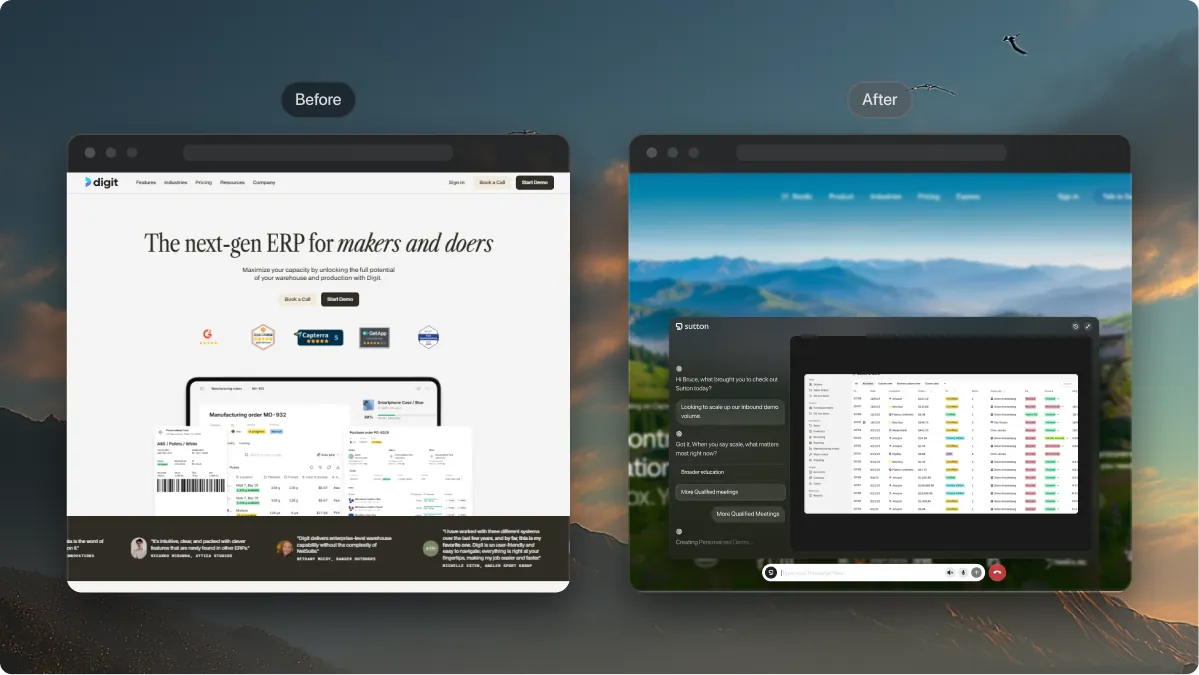
Sutton, an ERP platform for manufacturers and distributors, puts this into practice. Prospects could previously access its software through a free trial, but many struggled to evaluate complex workflows independently.

https://framerusercontent.com/images/JyhidFhHWgNeLsHpZR2hiWwhvE.webp
Sutton replaced its free-trial entry point with Hobbes, giving buyers a guided way to explore the product and ask questions relevant to their needs. According to its customer story, human demo bookings increased 50% month over month during the first 30 days.
Give prospects answers while they explore your product. Let them ask questions, explore relevant workflows, and experience your software through an interactive sandbox. See Your Agent.
Best Practices for the First Session
After someone signs up, their first session should clearly show them what they can accomplish with your software. Keep the initial experience focused on a meaningful outcome and introduce additional functionality as users become familiar with the product.
4. Define One Activation Milestone and Guide Users Toward It
Every SaaS product should have a clear activation milestone: the first meaningful action that shows a user has experienced the product’s value.
For example, creating an account in a project management tool doesn’t necessarily mean the user is activated. Creating a project and assigning the first task is a much stronger signal because they’ve started using the software for its intended purpose.
Once you’ve identified this milestone, work backward to determine which setup steps are essential. If you're using product walkthroughs, keep them focused on reaching this milestone and remove or postpone anything that doesn't help users complete the task.
Slack’s getting-started guide is a good example. It walks workspace creators through setting up channels and inviting colleagues. These actions move users toward Slack’s core purpose of communicating and collaborating with their team.

You can apply the same thinking to your product by tracking the percentage of new users who complete your chosen activation milestone and how long it takes them to reach it. This will give you a more meaningful measure of onboarding success than simply tracking whether someone finished a product tour.
5. Personalize Onboarding Based on User Roles and Experience Levels
A new administrator setting up your software needs different guidance from an employee invited to use it. Putting both through the same onboarding flow can waste time and leave important questions unanswered.
One way to personalize the experience is to use a short welcome survey to understand what each user wants to accomplish. Ask about their role, familiarity with similar tools, or the tasks they’ll use your product for. Then use their answers to customize the initial experience.
Asana’s custom onboarding lets enterprise admins create separate onboarding flows for different departments or user groups. Teams can determine which users receive each flow and direct them to a relevant starting page or onboarding project.
For example, a new marketing team member can go directly to their team's onboarding project, while someone joining another department gets a different starting experience.
If your product already knows a user’s department or permissions, use that information to determine their starting experience. This can eliminate unnecessary onboarding questions.
6. Let Users Practice Workflows in a Safe Environment
New users may hesitate to explore unfamiliar features when they’re worried about making mistakes in a live account. Someone learning a CRM, for example, might avoid changing pipeline settings because they don’t know whether those changes will affect their team’s existing data.
Set up a training environment with realistic sample data and a few tasks users are likely to perform in their daily work. Let them repeat those workflows as many times as they need.
For example, Hobbes offers interactive product sandboxes where new users can explore workflows without affecting their live accounts. Someone learning a CRM could practice creating a pipeline or updating contact records before performing those tasks with actual customer information.
Tip: Include a reset option so users can restore their sandbox to its original state and try a workflow again without manually undoing their changes.
7. Reveal Advanced Features Gradually as Users Need Them
Introducing every feature in the first session can overwhelm new users, especially when they’re still learning the basics. A better approach is progressive disclosure, a UX principle that introduces additional information and functionality when it becomes relevant.
Start by showing users the controls they need for their immediate task. Keep advanced options accessible, but let users discover them as they become more familiar with the product.
Canva offers a practical example. Its editor displays different editing options depending on what someone selects. Clicking a text element brings up text formatting controls, while selecting an image reveals options relevant to editing that image. This keeps the interface focused on the task at hand, even though Canva offers a much wider range of design tools.

You can apply this principle to your onboarding by introducing advanced settings only when users reach a workflow that requires them. For example, a reporting tool could introduce custom filters after someone creates their first report, rather than explaining every filtering option during setup.
If you’re evaluating tools to support these practices, check out our guide to the best SaaS user onboarding software, which compares five popular platforms.


Best Practices for the First Week
Onboarding doesn’t end after the first session. Users may still have unfinished setup tasks or need help incorporating your software into their daily work. During the first week, bring users back to relevant tasks and help them make progress based on what they’ve already accomplished.
8. Send Behavior-Triggered Onboarding Emails That Help Users Finish Tasks
Your new user completed setup yesterday. This morning, they receive another email reminding them to finish it. Meanwhile, someone who’s genuinely stuck gets the same generic message.
Attio, a CRM platform, offers a useful example. Its onboarding email campaign adapts to factors such as the user’s role, existing workspace memberships, and how far their new workspace has progressed.

Attio also identified a particularly important activation event: connecting an email database to populate the CRM with contacts. According to its customer story, users who completed this action were more than twice as likely to remain customers beyond 30 days.

Tip: Map your onboarding emails to specific product actions. For example, if someone creates a project but hasn’t invited any teammates after two days, send them a reminder with a direct link to the invitation screen. Once they complete the action, stop the reminders and move them to the next relevant step.
9. Onboard the Entire Team, Not Just the Person Who Signed Up
In B2B SaaS, the person who creates an account is rarely the only one who’ll use the software. They may configure the workspace, but getting value from the product often depends on colleagues joining and using it in their daily work.
Your onboarding process should account for everyone who’ll use the product, including people who join days or weeks after the initial setup. Here’s how you can approach this:
Make team invitations part of setup: Encourage account owners to invite relevant colleagues early, ideally once the workspace is ready for them.
Give new members a clear starting point: Direct invited users to an existing project or relevant workspace so they can begin working with their team’s actual setup.
Track adoption across the account: Look beyond whether the account owner completed onboarding. Check how many invited members have started using the product and whether they’re completing meaningful tasks.
For example, a project management platform might consider an account successfully onboarded once the team has created its first project, assigned tasks to multiple members, and started collaborating.
10. Track Onboarding Progress and Help Users Past Sticking Points
Say your onboarding dashboard shows 100 new signups, but only 30 users reached their first report. Where did the other 70 get stuck? Track each setup step to see where users abandon the process.
For example, if most users connect their data source but few go on to create their first report, investigate what happens between those two actions. They may be encountering an error, struggling with unclear instructions, or missing something they need to continue.
Galileo AI offers a useful real-world example. When the company opened its developer platform to self-service users, people created accounts but abandoned the experience after reaching the homepage.
According to a case study, the team used funnel analytics and session recordings to identify friction points, test changes, and refine the onboarding journey. Over six months, this iterative approach helped Galileo achieve a 12x improvement in activation.
Behavioral analytics can show where users leave a workflow, while Hobbes’ conversational intelligence provides additional context from their product-related questions. This helps teams investigate issues that completion rates alone may not explain.

Tip: Segment your onboarding funnel by user role, plan, or acquisition source. An overall completion rate might look healthy even when a particular user group consistently struggles with the same step.
Best Practices for Ongoing Onboarding
Once users are established in your product, onboarding shifts toward deeper adoption and continuous improvement. The final two practices address these priorities.
11. Introduce New Features When Users Are Ready to Adopt Them
Even experienced users may be unaware of features that could improve how they work, especially when you release new functionality.
Build ongoing product education into your onboarding strategy. Announce relevant updates through in-app messages or targeted emails, and link to a short tutorial showing how to use the feature.
For example, when you introduce automatic report scheduling, notify users who regularly export reports manually. Show them how to configure a recurring report and explain where they can manage scheduled deliveries.
When Figma introduced Figma Motion in June 2026, it also published tutorials and hands-on learning resources to help designers start creating animations directly within their design files.
Monitor how many users try the feature after receiving the announcement and whether they continue using it. This will help you evaluate which educational materials are actually driving adoption.
12. Use Onboarding Feedback to Improve the Product Experience
Your users can tell you about your onboarding in ways analytics alone won’t reveal. They might find a setup instruction confusing, struggle with an unfamiliar term, or discover that a help article no longer matches the product interface.
Collect feedback through short surveys, customer interviews, and support conversations. Assign recurring issues to the team responsible for fixing them, whether the solution involves updating training materials or changing the product itself.
Intellum, a learning management platform, offers a good example. Its onboarding originally relied on scheduled training sessions delivered by separate implementation and education teams, making the experience hard to scale.
According to a case study, the team moved to self-paced learning and used customer surveys and interviews to continually refine the training materials around common onboarding challenges.
The broader redesign delivered measurable results:
64% increase in early adoption rates across implementing teams.
40% reduction in onboarding-related support tickets.
Tip: Keep a shared feedback log that records the issue, how frequently it comes up, and who owns the fix. This makes it easier to turn recurring user complaints into improvements rather than letting them disappear into individual support conversations.
User Onboarding UX Patterns and When to Use Each
The right onboarding experience depends on what users need help with. A simple setup task might only require a checklist, while learning a complex workflow may call for hands-on practice or interactive guidance.
Here’s how common user onboarding UX patterns compare and when each makes sense.
UX Pattern | When to Use It | When to Skip It |
Welcome screens | To collect basic user preferences or introduce the first step. | When users can get started immediately without extra questions. |
Onboarding checklists | When users need to complete several setup tasks in a particular order. | When the product has only one or two obvious starting actions. |
Tooltips and hotspots | To explain unfamiliar controls or highlight a specific feature. | When users need to learn a complete workflow. |
Product tours | To guide users through a predictable sequence of screens or actions. | When users have different goals that don’t fit a fixed path. |
Interactive sandboxes | To let users practice complex workflows without affecting live data. | When the product is simple enough to learn directly. |
Onboarding emails | To remind users about unfinished tasks and bring them back into the product. | When the user is already active and has completed the relevant task. |
AI product guides | To answer questions and provide contextual assistance during product exploration. | When basic instructions or static guidance are sufficient. |
You don’t have to choose just one pattern. A SaaS product might use a checklist for initial setup, contextual tooltips for unfamiliar controls, and an AI product guide for questions that require more detailed explanations.
For a closer look at how these experiences differ, read our guide to interactive demos, including the different formats and when to use each.
Onboard Every User With a Product Guide From Hobbes
Complex SaaS products come with a learning curve, and your customer success team can only spend so much time walking people through the same workflows.
Hobbes gives new users an AI product agent and an interactive sandbox where they can explore workflows, ask questions, and get guidance tailored to what they're trying to accomplish. Users can learn at their own pace without waiting for a training session, reducing the routine guidance your customer success team needs to provide.
See Your Agent to experience how Hobbes works with your product.
FAQs
1. How Do You Measure SaaS User Onboarding Success?
Measure activation rate, time to value, and early retention. Calculate activation rate by dividing the number of new users who reach your activation milestone by the total number of new users in the same cohort, then multiply by 100. Compare results across cohorts to see whether onboarding improvements are working.
2. How Long Should User Onboarding Take?
It depends on your product’s complexity. Simple SaaS tools may take minutes to learn, while enterprise software with integrations and complex workflows can require days or weeks.
3. What’s the Difference Between User Onboarding and Product Adoption?
User onboarding helps people learn how to use a product and complete their initial tasks. Product adoption measures how consistently they use the software and incorporate it into their work over time.
4. When Should SaaS Companies Use AI for Onboarding?
AI onboarding is particularly useful for complex SaaS products where users have varied questions or need guidance across multiple workflows. Tools like Hobbes can handle routine product assistance, while customer success teams focus on account-specific implementation and more complex issues.
Chirag Kulkarni
Co-Founder, Hobbes
Chirag Kulkarni is the co-founder and CEO of Hobbes, an AI company building autonomous, conversational product demos for B2B software companies. Before Hobbes, he worked at McKinsey, built AI tools for the Pentagon, and held strategy and operations roles at high-growth startups.



Get a Demo

15 min read
5 Best User Onboarding Software for SaaS Products (2026)
The best user onboarding software: 1. Hobbes 2. Userpilot 3. Appcues 4. Userflow 5. Pendo. See features, pricing & more.
17 min read
7 Best Consensus Alternatives for B2B SaaS in 2026
The top Consensus alternatives are Hobbes, Reprise, Walnut, Storylane, Navattic, and Demostack, differing in format, setup time, personalization, and pricing.
8 Best Conversational AI for Inbound Leads (2026)
The best conversational AI for inbound leads: 1. Hobbes 2. 1mind 3. Qualified 4. Fin 5. Handhold. See features, pricing & more.
7 Best 1mind Alternatives Reviewed for B2B SaaS in 2026
Compare 1mind alternatives for B2B SaaS, including interactive demos, AI product experiences, pricing, key features, and best-fit use cases
8 Best Supademo Alternatives for B2B SaaS Teams in 2026
The top Supademo alternatives are Hobbes, Storylane, Navattic, Arcade, Walnut and Consensus, differing on format, AI depth, analytics and per creator pricing.
8 Best Demostack Alternatives for B2B SaaS Teams in 2026
The top Demostack alternatives are Hobbes, Reprise, Walnut, Storylane, Navattic and Consensus, differing on format, setup time, personalization and pricing.
21 min read
Demo Automation Guide: Steps, Tools and 2026 Benchmarks
Demo automation is the use of software to run product demos without a rep on every call, from recorded walkthroughs to AI led sandbox demos that qualify buyers.
13 min read
SaaS Product Demo 2026: Software, Examples & Best Practices
A SaaS product demo shows a buyer your product solving their problem. Compare five formats, build one in five steps, and use the 30-minute call script.
17 min read
8 Best Product Demo Software Platforms for SaaS Teams in 2026
The best product demo software includes Hobbes, Storylane, Navattic, and Reprise, spanning conversational, tour, sandbox, and live overlay formats.
17 min read
Interactive Demo Benefits, Types, Tools & 3 Examples
An interactive demo lets buyers explore a product instead of simply watching a presentation. Learn how it works, its types, benefits, tools, and examples.
Experience a Demo
Ready to see Hobbes in Action?
Designed for teams who need control, consistency, and measurable impact across every demo touchpoint.