Chirag Kulkarni
Co-Founder, Hobbes
Chirag Kulkarni is the co-founder and CEO of Hobbes, an AI company building autonomous, conversational product demos for B2B software companies. Before Hobbes, he worked at McKinsey, built AI tools for the Pentagon, and held strategy and operations roles at high-growth startups.
Key takeaways
A SaaS product demo shows one buyer your software solving one problem they have. The format decides who controls the pace, so pick the format before the tool.
SaaS product demos split into five formats that cover almost every use case. Tours and videos tell your story, sandboxes let buyers explore, and conversations answer what they ask.
To create your demo, start by picking one use case, choose the format, storyboard the before and after, ship it ungated, then simulate and iterate against real questions.
Put nothing in front of the first look. A form ahead of the demo recreates the problem you built the demo to solve.
A SaaS product demo is a live, recorded, or interactive experience that shows a buyer your software solving their specific problem, so they can judge fit before committing to a sales call. Most teams still put a form in front of it, and that form converts only 1.1% of SaaS visitors. The other 98.9% leave without seeing anything.
Those visitors are potential customers who never get to experience your product. The demo page is where they decide, which makes it the first sales conversation rather than a step before one.Whoever owns that page, usually the product marketer or growth lead, now owns the part of the funnel a rep used to handle.
By the end you'll know which format to build, how to build it, and how to tell whether it's working.
What Is a SaaS Product Demo?
A SaaS product demo proves your software solves a defined problem for a specific buyer. It isn't a feature inventory. Buyers remember the workflow you changed, not the twelve capabilities you listed on the way there.
Enterprise buyers consult product demos more than any other resource, 55% of them, and demos are the number one tactic vendors invest in. Of the top five on each side, only demos and your website appear on both. The demo is where buyer demand and vendor spend actually meet, which is why a weak one is expensive.

No single version works for everyone, which is why the formats multiplied. Someone comparing four vendors on a Tuesday night wants the interface now. A CFO eight weeks in wants proof, security answers, and a number. One asset can't serve both, so most SaaS teams run two or three rather than betting everything on a calendar link.
What Makes a SaaS Demo Different
B2B SaaS demos carry weight that consumer demos never do. Buyers reach you 61% of the way through their evaluation, so the demo lands in the middle of a decision rather than at the start of one. Four pressures shape every decision you make about format and depth.
Multiple stakeholders with competing priorities: End users want usability, IT wants security and integrations, finance wants the business case, and one demo has to serve all three without becoming a feature dump.
Technical scrutiny after the fact: Enterprise buyers shortlist from your demo, then hand you to solutions engineers who test every claim it made.
Workflow specificity: Generic demos fail because they ignore the buyer's environment. People want their data structures, use case, and stack reflected back.
Asynchronous consumption: Buying committees rarely watch together, so a demo forwarded across time zones has to work without you in the room.
Cover all four and the demo holds up in the room, on the forward, and under the technical review.
What Are the Different SaaS Product Demo Formats?
Teams pick a demo automation tool before they pick a format, then wonder why the demo underperforms. An interactive sales demo and a 90-second video do completely different jobs. Decide the format first. This table compares all five on the two questions that change your pipeline.
Format | Best For | Who Drives the Demo | What You Learn About the Buyer | Ideal Stage |
Guided product tour | High-volume inbound and feature pages | You do, via a pre-built click path | Which steps they reached, where they dropped | Top of funnel |
Recorded demo video | Forwarding to absent stakeholders | You do, via a fixed narrative | Watch time and completion rate | Middle of funnel |
Sandbox environment | Technical evaluators testing real workflows | The buyer does, with no set path | Which features they tried, how long they stayed | Bottom of funnel |
Live demo call | Qualified deals with budget and timeline | A rep does, adapting in the room | Whatever they say out loud, if you ask well | Bottom of funnel |
Conversational demo | Buyers who want answers before a call | The buyer does, by asking questions | Their role, use case, objections, and intent | Middle to bottom |
Guided Product Tour
A guided product tour walks a visitor through a pre-built click path of your interface. Storylane, Navattic, and Arcade build these fast, and step-level analytics show where attention dies. Egnyte splits its library by use case, so a visitor picks the workflow they came for.
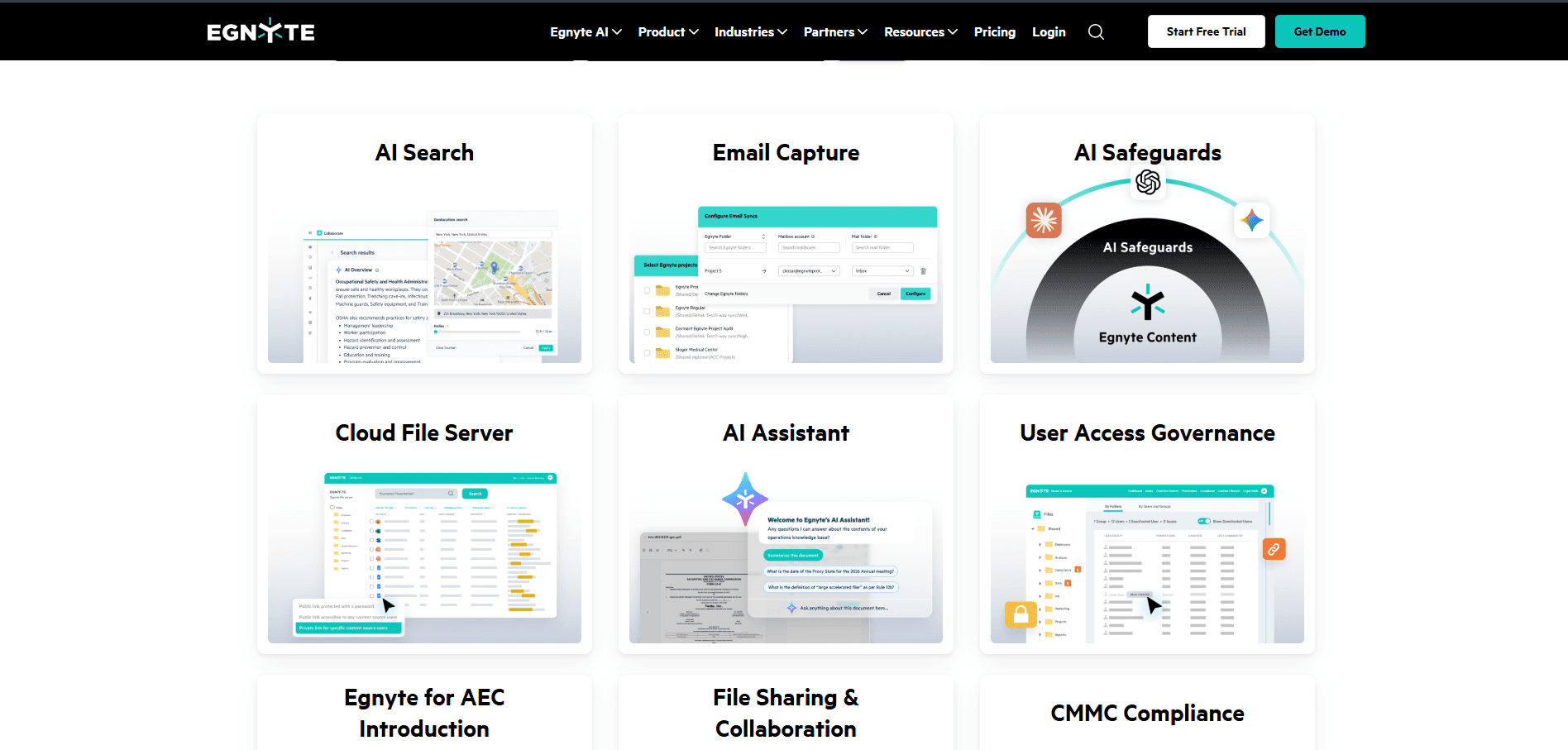
The limit is rigidity. Every visitor sees the same sequence, so a tour can't answer the question a buyer thinks of halfway through. Keep tours under 10 steps. Learn more about how interactive demos work across the funnel.
Recorded Demo Video
A SaaS product demo video is a narrated screen capture of a workflow, usually 60 to 120 seconds. It travels well, which is the whole argument for it. Your champion forwards one link and four stakeholders watch before the next call. Linear publishes a short intro before asking a visitor for anything.

Video is the cheapest format to produce and the most expensive to maintain. Every interface change means recording again, and nothing asks the viewer to do anything. Use video for the parts of your story that stay stable.
Sandbox Environment
A sandbox gives buyers a working environment with realistic data, so they test their own workflow instead of yours. Grafana keeps one open to the public with no login. Reprise built the category for enterprise presales, where proving the product handles messy data decides the deal. This same approach can help existing customers explore new workflows and discover additional use cases through customer expansion.

Sandboxes convert with technical evaluators because nothing is staged. That same openness is what strands buyers. A buyer alone in your product hits a question, finds nobody to ask, and closes the tab, so a sandbox works best with a guide inside it.
Live Demo Call
A live demo call is a rep presenting your product to a qualified buyer in real time. It's still the strongest format for complex deals, because a good AE reads hesitation and adjusts on the spot. Atlassian runs a weekly group demo of Jira with live Q&A, then posts the recording.

The cost is throughput. Scheduling friction, no-shows, and time zones cap how many you run. Reserve live calls for buyers who've already seen the product and arrived with real questions.
Conversational Demo
A conversational demo lets a buyer ask for what they want to see and get it immediately, with the relevant product view coming up alongside the answer. A conversation the buyer drives, instead of a click path someone pre-built. Hobbes runs one on itself, so you can ask a question and watch the view change to match it.

The format collapses two funnel stages into one. The buyer gets their evaluation, and you get their role, use case, and objections from the same session. The tradeoff is preparation, since the agent trains on your docs, calls, and positioning first. See what an AI demo agent does and how to evaluate one.
How to Create a SaaS Product Demo: Step-by-Step Process
Five steps take a SaaS product demo from blank page to live asset. Order matters, because teams who pick software first end up building whatever that software makes easy.
Step 1: Pick One Use Case and One Buyer
Name the one workflow this demo exists to prove and the one role who cares. "Revenue teams" isn't a buyer. "A RevOps lead who spends Friday afternoons reconciling pipeline by hand" is.
Write the thesis as one sentence before you open any tool. Show [role] how to [job] without [what they do today]. Blanks you can't fill are the research you still owe.
Step 2: Choose the Format Before the Tool
Match the format to where the demo will live. A feature page wants a tour, an outbound sequence wants a personalized link, and a demo page wants something that answers questions.
Only then shortlist tools, and put the same three questions to every vendor.
Time to live: How long until the first demo is running on your site?
Maintenance: Who updates it when the UI changes next sprint?
Staffing: Does a human have to be present for it to run?
Compare the demo software categories side by side before you shortlist.
Step 3: Storyboard the Before and After
Storyboard three beats. The workaround the buyer uses today, the moment your product replaces it, and the result they can measure afterward. Anything outside those three comes out.
Cap it at three capabilities, each tied to a complaint buyers already make. Sales call recordings, win-loss notes, and support tickets tell you which three show up in closed deals.
Step 4: Build It and Ship It Ungated
Build the shortest version that proves the thesis. For a tour that means under 10 steps, for a video under two minutes, and for a conversation whatever the buyer asks for.
Publish it where buyers already are, because your homepage, pricing page, and feature pages carry more qualified traffic than your demo page. Label the entry point for what happens next. "See it in action" promises something immediate, where "Request a demo" promises a wait.
Step 5: Simulate, Then Iterate
Run the demo against real buyer scenarios before launch. Give three people outside the product team a role to play and a goal to reach, then log every question the demo can't answer.
After launch those questions become the backlog. Track where sessions stop, and treat recurring confusion at one step as a problem with the step before it.
Hobbes runs the same loop on its own. It simulates buyer scenarios before launch, flags what it can't answer instead of guessing, re-reads your docs and help center as they change, and remembers returning visitors, so a second session picks up where the first stopped.
SaaS Demo Script Template
Use this template for the qualified live call, the one that happens after the buyer has seen your product on the site. Adjust timings for deal complexity.
The First 8 Minutes: Agenda and Discovery Recap
0:00 to 3:00, agenda and qualification. Confirm who's on the call and what each needs. State the objective in one line, then ask what would make the next 30 minutes worthwhile.
3:00 to 8:00, discovery recap. Summarize what you know about their process, including anything they explored on your site. Ask them to correct you, then listen.
Minutes 8 to 23: Workflow and Technical Validation
8:00 to 18:00, core workflow. Show the before state for two minutes, then the after for eight. Stay on one workflow and pause every three or four minutes for questions.
18:00 to 23:00, technical validation. Cover security, integrations, and admin controls. Invite the technical stakeholder to push, because unanswered questions return as procurement delays.

Minutes 23 to 30: Proof and Next Steps
23:00 to 28:00, proof. Share one customer story from a similar company, industry, or deal size. One told properly beats three listed.
28:00 to 30:00, next steps. Propose a specific next action, assign owners, and set a date. "I'll follow up" ends momentum.
Key Metrics to Track SaaS Product Demo Effectiveness
Track the metrics that connect demo activity to pipeline. A hundred demos that produce nothing are worse than twenty that produce five opportunities.
Demo engagement rate. The share of site visitors who start a demo. This moves the moment you remove a gate.
Time to first demo. The lag between intent and product experience. Self-serve should measure in seconds, live calls in under 24 hours.
Question volume and themes. What buyers ask, and how often. Recurring questions belong in your messaging, not just the demo.
Completion and depth. How far buyers get and where they stop. Drop-off points tell you which part of the story fails.
Demo-to-opportunity conversion. Segment by first-touch format. Self-serve and rep-led demos convert differently, and blending them hides both.
Post-demo booking rate. The share of self-serve demos that produce a booked meeting. This is what proves the demo is doing sales work, not marketing work.
Review these monthly and push what you learn back into the demo. Conversational intelligence surfaces the question-level detail engagement dashboards miss.
Examples of the Best SaaS Product Demos
Four SaaS teams each fixed a different bottleneck, and every demo example below is worth stealing for a different reason.
HyperSpell: Replacing the Demo Form With a Conversation

HyperSpell sells the memory and context layer for AI agents, and demand arrived faster than two founders could run 30-minute calls. Most of each call went to working out whether the prospect was a fit, so they paused the demo flow.
They replaced it with an agent named Harper. Sessions run 7+ minutes, qualified conversion against their ICP criteria sits at 82%, and the company doubled its revenue in six weeks. None of that looked likely to founder and CEO Conor Brennan-Burke, who resisted the idea at first. "I really don't want to hand over the keys to the kingdom." He now says he won't go back.
Sutton: Swapping a Free Trial for a Guided Demo

Sutton, formerly Digit, builds ERP software for manufacturers and distributors. Their free trial gave buyers access without answers, producing low-intent signups while serious buyers stayed stuck on their checklists.
Replacing the trial with a guided, agent-led demo raised human demo bookings by more than 50% in the first 30 days. CRO Simon Kronenberg put the goal plainly. "Our goal was not to replace our humans, but make them as busy as possible with as many qualified demos as possible."
For complex products, access and understanding are different things.
Start Demo and ask Hobbes how qualification works, with no form to fill, no rep on the other side, and the answer coming up on the product itself.
SalonScale: Meeting Buyers at 11 p.m.

SalonScale sells to salon owners who work with clients all day and research software after hours. Their traffic was fine. Their timing wasn't.
After putting a 24/7 demo on the site, 64% of demos happened outside business hours, and those sessions produced twice as many high-intent prospects. End-to-end conversion to signup passed 10%. Sales lead Whitney Hight sees it from her side. "Hobbes provides a way for customers to check out our system on their own time, which is invaluable."
Buyers don't evaluate software on your sales team's schedule, so coverage is a format decision. No lead waits overnight.
Hobbes: A Demo That Demos Itself

The strongest demo asset a SaaS company can publish is the product selling itself. Hobbes runs its own agent on an interactive sandbox of its own product, so a visitor asks what qualification looks like and watches it happen on screen. Nothing is edited and the buyer picks the path, which closes the credibility gap every recorded demo carries.
Any product with a usable interface can do a version of this. The question is whether yours survives an unscripted question.
How to Get the Most of Your SaaS Product Demo
Most demo problems trace back to four fixable habits.
Stop Gating the First Look
Gating trades a handful of contact records for everyone else's attention, and only 3% to 3.5% of visitors fill out any form. Open the first experience to everyone, then ask for an email once the buyer wants a personalized environment or a booked call.
Show the Messy Path
Clean demo data convinces nobody who has seen their own CRM, and buyers assume anything you skipped is something the product handles badly. Show duplicates, exceptions, and the error state. Explain what happens when an import fails. Credibility built here survives the technical review.
Qualify Inside the Demo
A form collects data without qualifying anyone, which leaves reps running discovery on calls that should have been about fit. Only 22% of demo requests become qualified opportunities. Ask the qualifying questions while the buyer is engaged and answering feels natural. AI lead qualification handles that inside the conversation.
Route the Whole Session
A score tells a rep how interested someone is, not what they asked, so the rep opens the record and starts from zero anyway. Enrich the contact, score against your own ICP criteria, and push the transcript into the CRM before the rep gets there. Personalized demos convert better partly because the follow-up is personalized too.
Adapt Your Demo Experience to Your User With Hobbes
Your reps stop sitting through discovery calls with people who were never going to buy. Hobbes is an AI product agent, and as an AI employee for sales it meets every visitor with an interactive sandbox of your product. Buyers ask anything, by text or voice, and the answer arrives with the product on screen. While that runs, it enriches the contact, scores them against the ICP criteria you set, and routes them to the right rep.
Point Hobbes at your product and the first sandbox can be standing inside an hour. No engineering ticket. Hobbes runs 24/7 in 30+ languages, interface included. Reps only meet real buyers.
See Your Agent built on your own software, or Talk to Hobbes about what that takes.
FAQs
1. How Long Should a SaaS Product Demo Be?
Two minutes for a SaaS demo video or an interactive demo, and 20 to 28 minutes of content for a live call in a 30-minute slot. Self-serve formats lose people after roughly 10 steps. Conversational sessions run longer, because the buyer sets the pace.
2. Should You Gate Your SaaS Product Demo?
No, not the first one. Gating the initial experience costs you the majority of your traffic in exchange for a small number of records. Ask for an email at the moment the buyer wants a personalized environment or a booked call.
3. What Is the Difference Between a Product Demo and a Free Trial?
A demo shows the product solving a problem with guidance. A trial hands over the product and hopes the buyer finds the value alone. Trials suit simple products with fast time to value. Complex products convert better guided, as Sutton found when they swapped one for the other.
4. How Often Should You Update a SaaS Product Demo?
Quarterly at minimum, and immediately after any interface change a buyer would notice. Recorded demos age fastest, because updating one means recording it again. Hobbes re-reads your docs and help center as they change, so the demo stays current without a production cycle.
Chirag Kulkarni
Co-Founder, Hobbes
Chirag Kulkarni is the co-founder and CEO of Hobbes, an AI company building autonomous, conversational product demos for B2B software companies. Before Hobbes, he worked at McKinsey, built AI tools for the Pentagon, and held strategy and operations roles at high-growth startups.



Get a Demo

8 Best Supademo Alternatives for B2B SaaS Teams in 2026
The top Supademo alternatives are Hobbes, Storylane, Navattic, Arcade, Walnut and Consensus, differing on format, AI depth, analytics and per creator pricing.
8 Best Demostack Alternatives for B2B SaaS Teams in 2026
The top Demostack alternatives are Hobbes, Reprise, Walnut, Storylane, Navattic and Consensus, differing on format, setup time, personalization and pricing.
21 min read
Demo Automation Guide: Steps, Tools and 2026 Benchmarks
Demo automation is the use of software to run product demos without a rep on every call, from recorded walkthroughs to AI led sandbox demos that qualify buyers.
17 min read
8 Best Product Demo Software Platforms for SaaS Teams in 2026
The best product demo software includes Hobbes, Storylane, Navattic, and Reprise, spanning conversational, tour, sandbox, and live overlay formats.
17 min read
Interactive Demo Benefits, Types, Tools & 3 Examples
An interactive demo lets buyers explore a product instead of simply watching a presentation. Learn how it works, its types, benefits, tools, and examples.
12 min read
What is an AI Demo Agent: How It Works and What to Look For
An AI demo agent runs a live, conversational product demo on your site and qualifies the buyer. See the three types, how they work, and what to look for.
17 min read
9 Best Product Tour Software Tools for SaaS Teams (2026)
Product tour software helps SaaS teams create interactive product experiences for onboarding or sales. Compare top tools and see where Hobbes fits
18 min read
Best Storylane Alternatives in 2026: 7 Tools Compared
The top Storylane alternatives include Hobbes, Navattic, Walnut, and Supademo, each fitting different demo formats, team budgets, and sales motions.
4 min read
Best 9 Sales Demo Software for SaaS Teams (2026 Reviewed)
Compare the best sales demo software for interactive demos, personalization, and buyer engagement. See which tool fits your sales process.
4 min read
The ROI of Demo Automation: Real Numbers
The real ROI of demo automation: BDR costs $106-119K/yr vs. AI demos at $36K/yr. Actual numbers on ramp time, coverage, and conversion.
Experience a Demo
Ready to see Hobbes in Action?
Designed for teams who need control, consistency, and measurable impact across every demo touchpoint.